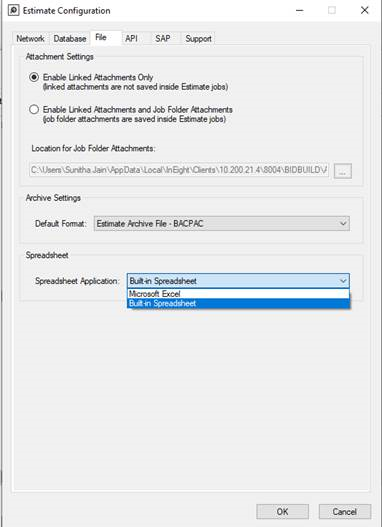
Built-In Spreadsheet
Most of the time, a cloud-based deployment of the Microsoft Office products, including Excel, are installed on new laptops or machines as the default installation option for Office 2016. Estimate's Excel integration relies on an on-premise (according to Microsoft) installation of the Microsoft Office products.
Estimate supports the option to use spreadsheet control for those that do not have the on-premises version of Microsoft Excel installed. You can switch between the Embedded workbook and the spreadsheet control from the Configuration Tool.
This option lets you use the functionality of the embedded workbook without having an on-premises installation of Microsoft Excel.
Follow the step by step below to change to the Built-In Spreadsheet option.
Step by Step — Built-In Spreadsheet
-
From the Windows Start Menu, search for Configuration Tool. The Estimate Configuration window opens.
If Estimate has been directly installed on your machine, the Estimate Configuration window will appear. If you cannot find your Estimate Configuration, contact support.
-
Select the File tab.
- Under the Spreadsheet data box, select the Spreadsheet Application drop-down arrow.
- Select the option Built-In Spreadsheet.